Featured Article
Showing posts with label windows. Show all posts

Easiest Way Of Genune Your Windows 100% Works {Guaranteed}


Guys, listen. There are a lot of softwares to make windows genuine. But in real most of them are fake & don't works effectively... To make your XP Genuine don't need to donwload anything, just create it yourself. Its so simple, harmless & works 100%.....


Note: Please read Steps attentively..... Dont close this tab & just do so that described in the description step by step.............

>> All you have to do this............

Step-1
Copy the following message:
CODE: SELECT ALL
Windows Registry Editor Version 5.00

[HKEY_LOCAL_MACHINE\SOFTWARE\Microsoft\Windows NT\CurrentVersion]
"CurrentBuild"="1.511.1 () (Obsolete data - do not use)"
"ProductId"="55274-640-7450093-23464"
"DigitalProductId"=hex:a4,00,00,00,03,00,00,00,35, 35,32,37,34,2d,36,34,30,2d,\
37,34,35,30,30,39,33,2d,32,33,34,36,34,00,2e,00,00 ,00,41,32,32,2d,30,30,30,\
30,31,00,00,00,00,00,00,00,62,fc,61,4c,e0,26,33,16 ,05,d3,54,e7,a0,de,00,00,\
00,00,00,00,49,36,c2,49,20,47,0c,00,00,00,00,00,00 ,00,00,00,00,00,00,00,00,\
00,00,00,00,00,00,00,00,00,00,00,33,33,35,30,30,00 ,00,00,00,00,00,00,65,10,\
00,00,74,99,dd,b0,f7,07,00,00,98,10,00,00,00,00,00 ,00,00,00,00,00,00,00,00,\
00,00,00,00,00,00,00,00,00,00,00,00,00,00,00,00,00 ,c4,ae,d6,1c
"LicenseInfo"=hex:e7,77,18,19,f8,08,fc,7d,e8,f0,df ,12,6e,46,cb,3f,ad,b2,dd,b9,\
15,18,16,c0,bc,c3,6a,7d,4a,80,8b,31,13,37,5a,78,a2 ,06,c8,6b,b9,d9,dd,cc,6a,\
9c,c5,9b,77,aa,07,8d,56,6a,7c,e4

[HKEY_LOCAL_MACHINE\SOFTWARE\Microsoft\Windows NT\CurrentVersion\WPAEvents]
"OOBETimer"=hex:ff,d5,71,d6,8b,6a,8d,6f,d5,33,93,fd


Step-2
Open and copy to Notepad.

Step-3
In notepad click "File" then click "Save As".

Step-4
For file type in the save dialog box select "All Files" and for the filename type inyour name.reg or whatever you want. It doesn't matter as long as it has the .reg extension. (Just put your name in the place - "your name").

Step-5
Click "Save" to desktop.

Step-6
Double click the saved File thats now on your desktop.

Step-7
It will ask you "Are You Sure ?"

Step-10
Click on "Yes".

Step-8
Done......

Step-9
Now To See That It Worked, Go Here:
CODE: SELECT ALL
http://www.microsoft.com/genuine/downloads/FAQ.aspx


Step11
Your windows is now validated. 


Get multiple desktops Free software


Are you fed up working on your desktop with so many windows in it. No need to worry, now you can split your windows into multiple desktops with Dexpot. Dexpot is a multi-desktop organizer and virtual desktop manager that creates multiple desktops. You can easily switch the desktop by just a mouse click.


Deskpot
Deskpot allows upto 20 virtual desktops that can effectively increase the efficiency of your work. It gives you more comfort without causing any chaos. For example you can surf the web on Desktop 1, listen music on Desktop 2, do blogging on Desktop 3 or switch to Desktop 4 for playing games. You can also configure different icons, wallpapers, and much more for each desktops.


How it Works
You need to install the deskpot and it will eventually split your desktop into multiple desktops.And switching the desktop can be done by a mouse click. It has the following features:


* You can select the number of desktops from 2 to 20.


*The desktop background can be customized for each monitor separately.


*The specific application can be assigned to particular desktop.


*Desired hotkeys can be assigned for desktop switching.

So try the new Deskpot and ease your working using virtual desktops. It is very much beneficial for users having tablets, netbooks or small screen device.  Give your reviews.
Download Deskpot 
http://www.dexpot.de/index.php?id=danke

Windows Loader v2.0.6 By Daz


download torrent

How to Get windows8 look on windows7

Do you getting very Bored about windows 7 Look?  Wanna try Windows 8?
Here is the way to change windows 8 from Windows 7.. No need to Install Windows 8 OS
Download the Windows 8 Skin pack here and Install it.

download

New Custom Windows 8 Themes! (for Windows 7)


We have added more Windows 8 themes. The following theme is a dark shell theme inspired by Windows 8:
And a new Windows 8 transformation pack for Windows 7:
Windows 8 Transformation Pack
Update: 10/12/11
Here’s is a new theme for Windows 7 that adds a lot of Windows 8 features, including the Metro desktop, user tiles, Aero auto-color and many more

Windows 8 Themepack Themes For Windows 7

April Update: Some new Windows 8 themes have been added. A new themepack with the latest Windows 8 M3 wallpapers can be downloaded here:
December Update: We have added a themepack for all Windows 7 users that includes various Windows 8 wallpapers. You can download this theme here:
Windows 8 Theme for Windows 7

Windows 8 Shell Themes (for Windows 7)

Windows 8 Theme for Windows 7
This theme modifies the progress bar, the start panel, the explorer shell, the start orb, the login screen and much more.

Windows 8 Transformation Themes (for Vista)

Windows 8 Transformation Pack
A Windows Vista theme that modifies your shell, logon backgrounds, desktop wallpapers, system tray icons and more. Mufflerexoz put a lot of work into this “Pro” theme. If Windows 8 will look similar to this we already have a winner ;)
Seriously, Microsoft should definitely hire some of the many dedicated theme designers to help improve the GUI (You probably heard the news that many parts of Windows 7 were inspired by MAC OS X). Muffler also created many other themes for XP, Vista and Windows 7. Hopefully, we will see some similar Windows 8 themes soon.

Ultimate Windows 8 Theme (for Vista)

Windows 8 Theme
A very simple transparent theme that modifies the Start orb and the build numbers. The creator is also probably using ObjectDock to add a MAC-like dock. Download Theme

Windows 8 Superbar Themes

Windows 8 Theme Superbar Vista
If you want to get a Windows-7-like taskbar in Windows Vista you’ll definitely need the “Superbar”. This theme inspired by Windows 8 makes use of the Superbar.
Download Theme

Windows 8 ViGlance Theme (for Vista)

Another theme by muffler that is using the Windows 7 Superbar. It also modifies the start orb. Download Theme

IMPROVING WINDOWS BOOT SPEED | STARTUP SPEED


Sometimes a computer tends to have a very slow boot speed due to several factors that my range from excesive hard disk partition, incorrect network settings, Antivirus software, USB device conflict e.t.c. But remember that you can always make slight changes or tweeks to help enhance your computers peformance.

To increase your computer's startup speed, you need to do the following:
  1. Press start=>run then type msconfig and press enter

Go to the startup tab where you will see a list of startup items. All the programs that automatically start when you boot your computer are listed in the startup tab.The more the items you have in your startup list, the slower the boot process of your ComputerTherefore you should uncheck all unneccessary items like ms-office, messengers other utilities that u may not be needed at startup. Don't uncheck your antivirus software. After you have done that, restart your Pc

     2.  You can also perform a boot defragment on your disk. defragmenting your disk helps in placing 
           fragmanted files together thereby enhancing computer speed. This option is enabled by default but its
           not on other computer systems. To turn on this option, do the following;
  • Go to start=> run
  • Type regedit then click ok
  • Navigate toHKEY_LOCAL_MACHINE\SOFTWARE\Microsoft\Dfrg\BootOptimizeFunction 
  • Select Enable from the list on the right.
  • Right click on it and select Modify.
  • Change the value to Y
  • Reboot your computer.

WINDOWS7 ACTIVATOR


This wreckless tool Can Crack microsoft windows7 that is 32-bit and 64-bit machines enabling a user to validate an illigal copy of windows7 OS. Tested and 100% working

DOWNLOAD
PassWord: code7

Unable to delete the file? here is the trick..


Unable to delete the file?


Here the trick how you can delete these kind of files.
Here are steps.
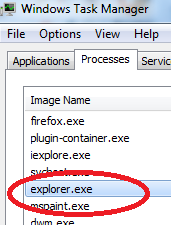
1)     1) Ctrl + Alt+ del  ( open the task manager)
2)      2)Select explorer and end the process.

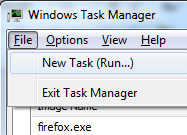
 3) 3)    Click file menu from task manager.


) $4)      Type in CMD in run ( opening command prompt)


  • 1)      Go to the file folder and delete the file using del command
  • 2)      Example
  • 3)      File name :- xyz.avi file , and folder name is movies
  • 4)      C:\cd movies
  • 5)      C:\movies\ Del  xyz.avi
  • Now we should restore the Explorer back
  • 6)      Go back to task manager
  • 7)      Click file menu >> New Task
  • 8)      Type “ explorer” and press enter
   You should able to get your desktop back.

Popular Posts

mayur bhagat. Powered by Blogger.

Pages

Sponsor